2020/08/11

Imou Ranger IQ

Imou is a Chinese company, though not that easy to find on their English site (the actual company is Hangzhou Huacheng Network Technology Co.,Ltd), though the Store site refers to Primetech Ltd who are based in Rickmansworth just north of London.

The Ranger IQ is a golf ball type camera (about 8cm across) with a black base and black surround. The camera can swivel almost 360 (actually 355) degrees around and is can tilt 0-90 degrees the camera has a reasonable wide angle lens.

Setup is done using the Imou Life app (available on both iOS and Android). The camera uses a USB power supply (both cable and PSU supplied) and supports both wired Ethernet (100Mb/s) and WiFi (b/g/n so 2.4GHz) and comes with a mounting plate, screws and nicely a template allowing accurate placement for drilling holes.

The camera supports up to HD (1920x1080 at 25/30 fps) using H.264 and H.265 video compression and 16x digital zoom. There's also a microphone and speaker and a microSD card slot (supporting up to 256GB cards).

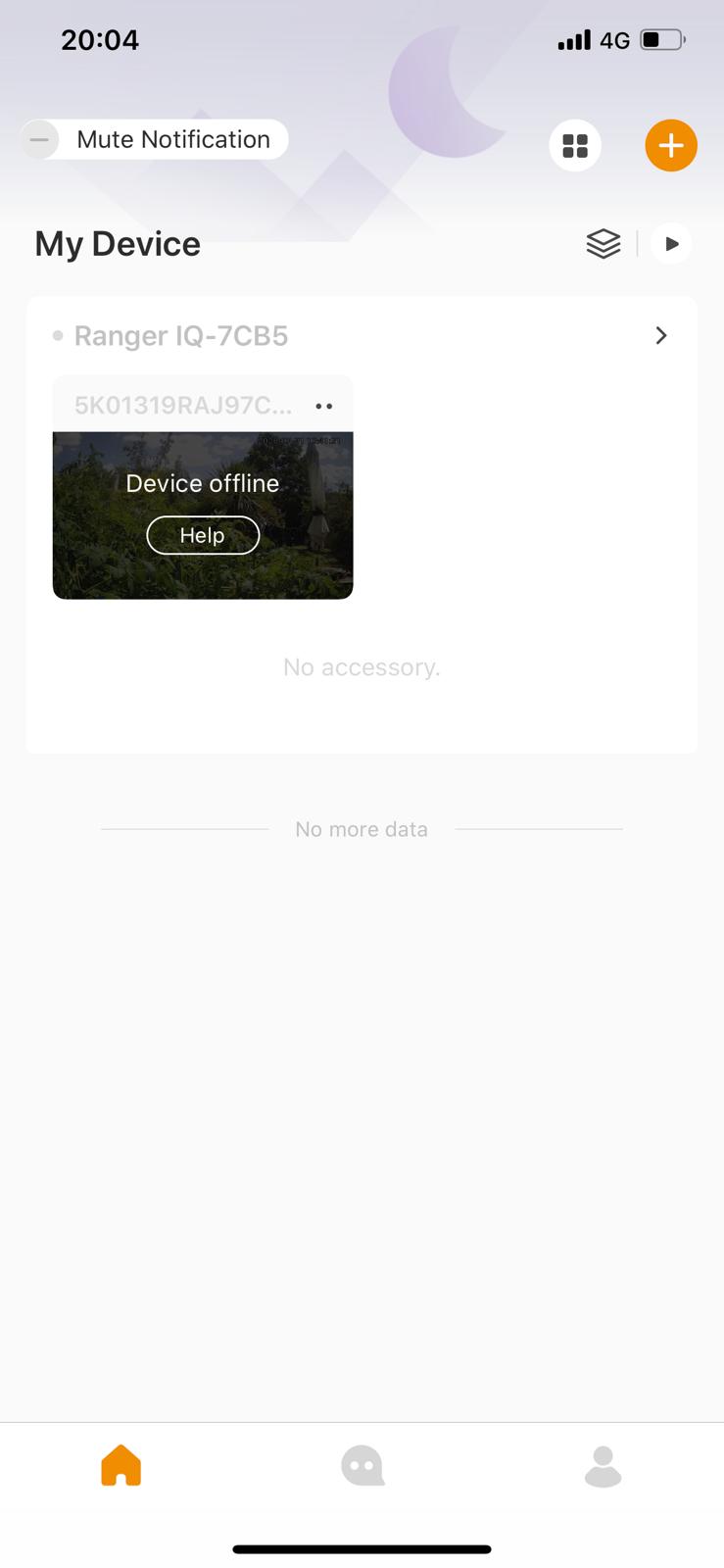
Opening the app presents a login/sign-up screen (and asks the normal security pop ups for notifications, using location and camera later). Sign-up with an email/password and it will send a verification code to the email (with a 15 minute validly). Once verified the main screens presented and it will be mainly empty. Click the + at the top right corner to add a device, then the camera will be used and scan the QR code on the camera.


It can be a bit fiddly to connect, but the password is on the sticker (which isn't obvious).


Once the device is added then it can be configured to send notifications when it detects someone (and follow them), when a noise happens over a certain threshold. Once triggered a short clip will be sent to the phone and a notification appear. If triggered the Ranger IQ can also be set to sound a siren or prerecorded announcement and the user can talk through the app. Setting triggering to humans is very accurate and in that mode pets will be ignored.


The app supports geofencing so it will automatically 'disarm' when in the defined zone so it doesn't trigger when, you get home. It's also important to set the sensitivity of the motion detection as if too sensitive it seems to trigger for events that don't seem to be there. It also has the ability to ignore a region in the camera's view so if there's a clock or something that move, it won't trigger. There's also a privacy mode whereby a plastic guard covers the camera so that it really cant see anything.


The above is monitoring a garden and has been used to monitor various wildlife that appear during the day and at night.


The camera has a night mode and it does work, though in complete darkness it might not pick a face.


There is an issue that when in privacy mode (i.e. the camera blocked that it can "fall off" the network and won't automatically reconnect.


Videos can be stored locally to the memory card and to Imou's cloud storage service (a monthly fee of £1.69, £2.49 and £5.99 for 3, 7 and 30 days respectively). Though having your video stored on Chinese servers may not be optimal.


It's available for £69.99 (reduced from £89.99 from the Imou Store


If purchasing via Amazon, the code BBVF9RUT (at checkout) should give 30% off.

2020/08/04

Youpin (Xiaomi) Duka 40m LS-P Digital Laser rangefinder

This is a little unit that seems solidly constructed with an aluminium case measuring 86 x 22 x 11 mm. It comes with an attachable lanyard (quite fiddly to get through the hole) and it charges via miniUSB. It only weights 28g.

It has a backlit LCD and two buttons. The button (on the same side as the LCD) starts the laser and the side button changes modes. Unfortunately it's quite complicated to work out the modes as the instruction manual is in Chinese. Units can be set to metres, inches or feet.

The stated maximum distance is 40m and though not fully tested, if it's dark and you can see the dot, it does measure long distances, it can measure continuously as it moves around. It also measures: - 

  • Area
  • Volume
  • Front and Back reference
  • Pythagorean
  • Max and Min
  • One button angles


Though some are relatively easy to work out how to use, without an English manual some of the modes won't make much sense.

The sensitivity does seem to be quite good and it's possible to see the red dot in quite bright outside conditions, though in order to measure the distance of something small, it's likely to be very difficult just in trying to keep the beam steady enough to keep it on the target area. The measurements are accurate to about 2mm.

The main button on the side of the LCD.

Long press turns the ranger on or off.

A 3s press should reset the measuring mode.

A short press will start the measuring mode and another short press will store it (each time).

A 1.5 second press and it will start continuously measuring (the display will show the maximum and minimum measurements).

Clicking the side button will put the device into area measurement (a trapezoid will show on screen), then clicking the top button will measure one side and a second press the 2nd side and an area displayed.

The side button pressed again will put the system into volume mode (a cube is shown on the display) and then the top button pressed for the three measurements.

A third press on the side button will put the unit in Pythagorean mode - a triangle will show (a squared + b squared equals c squared) and pressing to top button will measure a and then b.

A fourth press and a double Pythagorean mode showing a two triangles. Then top button will be a, b and e (the edge and vertices of the triangle and the base c will be calculated).

A 5th press and it's subtracted Pythagorean as above, but c is the base length between the last edge (e) and middle length (b).

The 6th press should put the system in angle mode, so press top button and you measure the base of the triangle, then another press and it will measure the height and calculate the hypotenuse.

There is also a settings mode.

It costs around $16 from your Chinese eCommerce site.

2020/07/20

Xiaomi (Yuwell) Pulse Oxymeter

This was listed as Xiaomi, but is made by Yuwell model YX303. It's a standalone unit powered by 2 AAA batteries and sized 58 x 32 x 34 mm.

The unit is hinged so you place you finger in between the two halves and then turn the unit on. The colour OLED will turn on and the screen will show a waveform and your pulse rate and blood oxygen level (pO2). It takes a few seconds to get a reading.


Quick pressing the button again will rotate the display 90 degrees, then again another 90 (so 180), again 270 and again back to the start.

If the finger is removed, the unit will indicate "sensor off" and turn itself off.


As a Xiaomi product it's at the upper end of the price range and there are other cheaper units out there. It's available on import for around £20 (not available through the UK site).

2020/06/16

Maybe Xiaomi wine bottle opener

It's hard to tell whether it's Xiaomi or not (it's sold as, but there's no branding on the opener itself).

The unit is a cylinder about 6 inches long and just wider than the neck of a bottle. It has a rocker switch on the top and 4 white LEDs to indicate charge and is clear at the bottom, so you can see the cork etc. It has rechargeable batteries and is charged with via microUSB.

It's very simple to use, please the bottom of the cylinder over the top of the wine bottle, press the bottom end of the rocker switch (make sure to hold the wine bottle too) and the screw will move down, enter the cork and then pull the cork out of the bottle. The transparent area will illuminate blue while the cork is being removed and turn red when complete. It may be necessary to slightly wiggle the unit for the cork to completely come out the bottle.

The unit should come with a foil cutter, but this one didn't have one included.

Once removed, just press the top of the switch and the cork will be ejected.

That's it. Very simple.

Why? you may ask. If anyone has arthritis or other ailment that doesn't allow them to use a normal corkscrew, this is the product for them.

It can be found on your Chinese site as the Original Xiaomi Mijia Huohou Automatic Red Wine Bottle Opener Electric Corkscrew Foil Cutter Cork Out Tool 6S and costs about £20. Definitely worthwhile if someone likes wine, but cant open a bottle.

2020/06/08

Xiaomi Portable Air Quality sensor

The portable air quality sensor definitely isn't available from the UK Mi store, but importable.

The unit measures about 6 x 9 x 2 cm and is a plain white case with an OLED display that shows the battery charge and the PM2.5 value. It's small enough to fit in a jean's or jacket pocket.

The sensor is branded SmartMi.

There's a button on the front that turns the unit on or off and a micro-USB socket for charging and that's it. Short pressing the button while the display is on will cycle between brightness settings (low, medium, high).

While it was sensible to do so, using it on the tube (is that ever sensible?) produced interesting results, especially on the Northern Line where PM2.5 levels could reach over 160ppm (not safe) in the deeper stations. The display will show a bar that's green, orange or red depending on the PM2.5 level 0-75, 76-150 and 150+ respectively.

Internally there's fan and a laser reflection/scatter system that measures the particulates.

Available through your Chinese import site for about £20.

2020/06/02

Xiaomi Mijia LCD HandWriting Blackboard

This is either the most amazing piece of Technolgy or the most useless. It comes in two sizes, 10 inch and 13.5 inch screen (measured diagonally) and a stylus magnetically attaches to the side so it doesn't get lost (though it's easy to knock off).

The board is powered by a CR2032 coin battery which should last a year if the screen is erased 100 times per day.

It's a touch sensitive LCD screen, that's sort of like an e-ink screen, though it's black to start with and when you touch it, the screen goes white, though really green. It's a bit odd. The harder you press, the thicker the line (within limits), but it can produce some really good results and some drawings look really lifelike.

Since it only uses power to clear the screen, drawings will stay there until they're erased.

There's a switch on the side which when in the on position allows the button below the screen to erase what's on screen. There's no way to save anything, what's on the screen is it and touching the screen will just add more stuff. The only way to transfer images off the screen is to take a photograph of it. If the side switch is moved to off, then the button below the screen has no effect.

The stylus isn't anything special, it's literally just a pen shaped piece of plastic with a magnet inside and a pointy end. Anything can be used in its place (just beware of scratching the screen).

The case of the actual unit is reasonably thick ABS.

The 10 inch version is about £10 and the 13.5 inch around £18 from your friendly Chinese import site. Not a huge amount to spend on what's really a blackboard, but it's surprising good for drawing things and they seem to be popping up in TV quiz shows where contestants need to write/draw things as the contrast is pretty good and they're readable from a distance.

Amazing tech? The jury's out on this one, but cheap enough to have a play and not worry about it.

2020/05/11

Xiaomi Smart Humidifier

Once again another Xiaomi product. This time a smart humidifier i.e. a device you fill with water and it squirts out a fine mist. It's smart as it can be controlled from Mi Home app (iOS and Android). It connects to the "Internet" via WiFi.

Setup is pretty straight forward, turn it on and then scan in the Mi App or scan the QR code on the instructions and you'll be taken into the app within the smart humidifier section. Once it's in config mode, it will transfer the WiFi settings to the device, update the firmware and then add the device to a room.

The Mi Home app does allow automation so the humidifier can be turned on if the humidity (from another sensor) drops below a certain level. It would be nice if Xiaomi supported Alexa integration, but currently they don't seem to. There are 4 settings on the device, light, medium and dense fog and auto where the unit will detect the humidity and produce for appropriately.

Not all the Xiaomi devices are available in the UK and it's only possible to add devices in that are sold in the region you've set the app to. Unfortunately a lot of devices that are available from import sites, aren't available in the UK so the fix is to set your region to Mainland China and all devices will appear (it's still possible to use the app in English).

As well as humidifying the water, there's a UVC light source that sterilises the water as it passes through, so any nasty bugs shouldn't survive the journey (not tested). It holds 4.5L of water which is enough for about 12 hours use and it will shut itself off (and the LED turns from Blue to Red and in app) if the water chamber is empty.

The only downside seems to be that if there are PM2.5 sensors, they'll pick up the mist / water droplets and report them as pollution and reading can go well over 1,000 ppm (which is pretty polluted) and that may cause issues if automating on pollution levels.

Can be had for about £50 importing from your friendly Chinese site (inc shipping).

2020/05/10

Xiaomi Air Quality Sensor

Today's Xiaomi review is of the Air Quality sensor, it's about 10 by 6 by 3 cm with a 10 cm capacitive colour touch screen with a resolution of 800 x 480.

There's a PM2.5 particulate laser reflective sensor and Sensiron TVOC/CO2a and Temp/Humidity sensors which are used to measure the air quality. TVOC is a measure of total volatile organic compounds which cover a range of substances from detergents through flammable liquids and gasses. The CO2 values aren't actually measured but approximated through various calculations on the sensor.

This is not a professional device, so the readings will be reasonably accurate, but don't base anything medical on the readings.

It's WiFi connected and connects back to the Mi back-end services and can be controlled by the Mi Home App. In the Mi App it's necessary to change the region to Mainland China of the device won't be found (or lost if configured in Mainland China and then say switch to Europe, but it will come back again if the region is changed back).

There are a variety of display modes which show average values of sensor readings and a clock of course which is set using Internet time sources so stays accurate. Even though the region in the app is set to Mainland China, a local timezone in the device can be set, so the correct time will be displayed (some other Xiaomi devices will show Chinese time).

An especially useful feature is the BLE gateway which can monitor other Xiaomi Home Bluetooth connected devices, collect their data and send it back to the Mi Home servers. So say there's a Xiaomi Home temperature/humidity sensor in another room that the Mi Home app would connect to, the BLE gateway can download its data, send it to Mi Home and then it's accessible via the Mia Home app from anywhere. This is actually pretty useful if there are other smart devices in the home and say the temperature is quite low, then turn the heating on so it'll be nice and cosy when you get home.

2020/05/09

Xiaomi True Wireless Earphones 2

Xiaomi make a lot of products, some look remarkably similar to each other. The True Wireless 2 earphones also seem to be Airdots 2 on Chinese sites, they are very similar to the Airdots 2S but the 2 have just USB-C charging while the 2S can also be wirelessly charged and have a longer battery life. The 2S variant isn't available of the Xiaomi EU site currently.

They are quite easy to pair, long pressing the button on the side of the case will put them into pairing mode, then connect to the phone and then opening the case or pressing the button will start pairing next time.

The earphones site on the ear much like the fruity company's original pods, so your mileage will vary on how well they fit or fall off. Personally in-earphones work better but lots of people are happy with this kind of design.

The earphones are Bluetooth 5.0 and support HD sound. They charge in around an hour and will play for 4 hours, though popping them into the case (which sarges them) allows up to 14 hours of play.

Each earphone has an infrared sensor and 2 microphones and tapping either earphone will answer a call (or hangup). Tapping twice on the left earphone will activate a voice assistant while tapping twice on the right will pause binaural mode and a single tap will activate single play. Removing an earphone will pause music play.

The binaural/single ear play are so it's possible to lend a colleague an earphone and they can listen to the same music you are (or listen to something else).

The dual microphones are used for noise cancellation, but as the earphones are only semi-in ear, that's mostly for speech etc and not for blocking outside noise during music play.

They are available from the Mi UK Store for £69.99 which is a bargain compared to their fruity counterparts, though Chinese (original) imports inc shipping can be had for around £30-40 (with a silicon case), the 2S are £10-20 more expensive.

2020/05/08

Xiaomi Bluetooth Speaker 2.0

Another day, another Xiaomi product. These are mini Bluetooth cylindrical speakers (they measure about 2 inches in height - well 48mm - and 2 inches across - 52mm) and the come in black or white.

Though small, the sound produced is remarkably good for the size, obviously they cant compete with bigger speakers with large bass speakers for the depth of sound, but just to have some background music, they work well.

If they can be placed apart the sound improves dramatically if you place yourself in the central zone.

The speakers are Bluetooth 5.0 and operate in stereo, however pairing can be slightly fiddly. The centre of the base is a switch surrounded by a "multifunctional switch" so when the speaker's pointing up, pressing the speaker actually presses the central switch.

  • Turn on by long pressing the switch (for about 2 seconds) and the speaker should turn on (blue light will flash)
  • Do the same for the other speaker
  • On Both speakers double click the multifunction switch and they should go into wireless stereo pairing mode
  • The "master" speaker will flash quickly and the "slave" slowly
  • Pair with a phone, laptop, other BLE device
The speakers also have a microphone and can be used to receive a call (tap the speaker when a call comes in and it will change to mic mode, however this can be annoying as the speaker can go into this mode even when a call isn't there by accidentally tapping it.

The power output is only 3W and the speakers are charged through a microUSB port.

The speaker are available from any of the friendly Chinese import sites and are about £20 (inc shipping). They're never going to compete with the big bass boomboxes, but for something that will fit in a jacket pocket and provide some background music and last for a couple of hours, they're really not bad.

2020/05/07

Gillette reinvents hot towel shaving

Razors come in many forms and Gillette has produced many shaving systems ending up with 5 blades and the various systems (Fusion, Proglide, Proshield etc). The handle system has been pretty static with a symbol type mount that holds the various blades.

In recent times it's even been possible to get a 3D printed handle in collaboration with Formlabs.

Now Gillette have brought back the concept of a hot shave but using modern technology with the Heated Razor. The handle has a battery and electronics in and the blades are Fusion 5, with a heating element. Turn the razor on and the element heats up and there's almost that hot towel shaving experience.

Coming out of Gillette Labs, the razor was initially launched on Indiegogo (and with the limitation of only US customers - it's useful to have friends in the US who will accept packages and forward them on, though this does mean added expense and delays especially when the prototype had to be returned and the release product shipped).

It uses the same ball/swivel mechanism as other Fusion 5 razors so the blades follow the contours of your face, but it's hot.

It does work and it feels quite pleasant. Surprisingly the razor feels a lot lighter than its size would convey, personally maybe too light.

The base is fairly heavy and the razor sits in the depression and is magnetically held there (and wirelessly charged). The power adapter fits a standard bathroom shaver outlet, but be warned, if using an electric toothbrush or other mains powered device, even if shaver outlet has two sockets it's generally only possible to plug one device in at a time (using one socket, shutters the other).

The power adapter has a long cable that terminates in a proprietary plug that fits firmly into the base (presumably designed to stop water getting in). If used outside the bathroom, a UK to US adapter will be needed to charge the razor.

Once powered on by "pressing" the power symbol, the power symbol and strip glow a warm red. Pressing thew power symbol again turns the temperature up (43 or 50 degrees C), another press turns it off.

It will function as a normal Fusion 5 razor if there's no power, but it's an expensive piece of tech to not use the heating function.

The razor is available direct from Gillette for £170 (subscription options are available for blades and will give a discount on the base too). A standard 4 pack of blades is £19.50 while an 8 pack is over double (?????) at £45.00

2020/04/03

It's time to Slide the Astro way

Planet Computers made a name for themselves by taking the Psion 5 clamshell design and making a modern version based on Android (well it could run multiple operating systems and dual boot Android and say Linux). The first version was the Gemini and then the Cosmo that had a small screen on the back to show who was calling and other notifications.

Well now is the latest evolution in mobile computing, the Astro Slide. Rather than being a clamshell, the outward facing display covers the keyboard and slides back and then the top moves up so it works like a normal screen. It will run Android 10.

This means none of the problems with actual folding screen and the complexity of manufactures. It's a high resolution touch screen, so the device works like a normal smartphone, but then slide back the display and there's a proper keyboard to type on.

The screen is 6.53 inches across with a resolution of 2340x1080 and 395 ppi, it's scratch resistant so is resistant to damage while in the phone state.

It's 5G and uses a modern Mediatek Dimensity 1000, MT6889 Octa-core SoC that is allegedly twice as fast as stuff that's out there now. As a phone there's 2 nano SIM slots and an eSIM all of which support 5G and it should support download speeds of 4.7Gps. Off course there's WiFi 6 too (the latest version).

The CPU has 4x A77 @ 2.6GHz, 256KB L2, 4x A55 @ 2.0GHz, 128KB L2 2MB L3, the GPU is an ARM G77 9-Core Manhattan 3.0: 120fps and there's an additional processing unit (for ML) 3rd Generation, 6-Core Total 4.5 TOPS.

It comes with 6GB of RAM and 128GB Flash which is expandable by microSD card.

The rear camera is 48MP and there's also a 5MP front camera for video conferencing (useful in this day and age). Stereo speakers and an ambient microphone. For those people who like wired headphone there's also a 3.5mm jack, for those that don't there also Bluetooth 5.1 and supporting the new BLE Audio standard. There's also NFC (and will support payment systems) and wireless charging. For the entertainment buffs there's also a built-in FM radio (no DAB?) and for knowing where you are a modern GPS chipset supporting AGPS, Glonass, Beidou, Galileo Band L1 + L5 GNSS.

If that wasn't enough, there's also 2 USB-C ports (supporting OTG) and DisplayPort via an adapter and an finger print sensor to ensure only the right person uses it.

The mechanical keyboard will be available in the following languages (the script is actually laser etched on the keys themselves) Arabic, Chinese, Croatian, Czech, Dvorak, Finnish / Swedish, French, German, Greek, Hebrew, Hungarian, Icelandic, Italian, Japanese, Korean, Norwegian / Danish, Polish, Portuguese, Russian, Spanish, Swiss, Thai, English UK, English US.

Unfortunately it's not going to ship for a while (March 2021), but is available on Indiegogo for an early bird price of £432.00 going up to £504.00 (the RRP will be £720.00).

2020/03/04

Xiaomi Band 4

Xiaomi make everything or they invest in other companies to make stuff for them. If you want something for the home, there will be a Xiaomi (or more likely under the Mi brand) product available. An electric toothbrush, yes, a pen (called a signing pen), yes. Lighting, yes, speakers, smart speakers, humidifiers, air purifiers, air quality sensors.

Some of the products are available directly in the UK (there's even a Mi Store at Westfield in Shepherd's Bush), download the Mi Store app and set your country and you can order through the app.

However in the UK there's only a tiny subset of what Xiaomi actually sell, if you dare, head over to Aliexpress and search of Xiaomi or Mi and see the plethora of products available. Reign in your credit card as it's easy to just buy everything.

Amazfit are one of the companies that Xiaomi initially invested in (and now may well own, another is Segway/Ninebot). There's a previous review of the Amazfit Cor and though the screen is monochrome OLED, it's still quite a nice tracker. Unfortunately the strap eventually broke (which doesn't seem replaceable which seems a shame as the actual unit was working perfectly), so the to replace with a Mi Band 4.

Mi have regularly updated the band and it's very cost effective compared to the general (US) competition (Fitbit etc). It's not the prettiest of devices, the central "pod" (which is removed from the strap to charge) is about 4cm long by 1.5 cm wide and 1cm high. It has a colour AMOLED display and optical pulse/heart rate sensor on the base in contact with the skin. The strap is silicone and uses a pass through system and a knob that pushes into a hole on the other side.

The quoted battery life is 20 days, though this can reduce if certain settings are enabled (like heart rate read every minute and accurate sleep tracking etc), however it's still pretty reasonable with everything turned up to the max and won't need charging for several days at least. The band is also waterproof down to 50m (i.e. 5 ATM of pressure) so good for a swim in the pool or shower, but not recommended for deep sea divers.

There are lots of "watch faces" available (most are horrid) and if you're an Android/Windows user, then are are sites that show how to design and install your own.

To get the data off the band it works with the Mi Fit app (which is available on both iOS and Android). All customisation is done through the app, though some can be done through settings on the band itself, though it's a bit fiddly.

It can all the normal things a tracker can i.e.

  • Notifications
  • Controlling Music
  • Calls
  • Steps
  • Calories

There's also workouts that can be tracked" -

  • Outdoor Running
  • Treadmill
  • Cycling
  • Walking
  • Freestyle
  • Pool swimming

The band can also display the Weather.

On the band itself it's possible to set (under More): -

  • Do Not Disturb (DND)
  • Alarms
  • Music
  • Stopwatch
  • Timer
  • Find Device
  • Band Display (brightness etc)

Everything works, heart rate tracking is as good as any optical sensor device can be as if you're doing sport and the band moved away from the skin, it's not going to measure properly. Sleep tracking works very well and shows speeds of awake, deep sleep and REM sleep.

The Official Mi UK price is £34.99 which is still pretty good for the features, however if waiting a few days and ordering from China isn't an issue that will significantly reduces the cost.

2019/10/25

ConceptDraw Office v6 is out

ConceptDraw Office is a suite of applications consisting of ConceptDraw DIAGRAM (v13), ConceptDraw MINDMAP (v11), ConceptDraw PROJECT (v10) and ConceptDraw STORE.

There's also an online service Concept BOOKS allowing sharing and collaborating of documents designed using ConceptDraw DIAGRAM and ConceptSraw PROJECT Server which does the same for collaborating online with ConceptDraw PROJECT.

The apps themselves are self-explanatory i.e. ConceptDraw DIAGRAM is for producing diagrams, MINDMAP fir mind mapping, brainstorming etc and PROJECT is like Visio from Microsoft and is for project managing things.

However the real power of ConceptDraw is the solutions that are available, some free and some paid for and there are a great many of them in-fact 158 free and 47 premium covering a vast array of topics.

The free solutions topics are: -

  • Building Plans
  • Business Processes
  • Business Productivity
  • Collaboration
  • Computer and Networks
  • Dashboards
  • Diagrams
  • Finance and Accounting
  • Food and Beverage
  • Graphs and Charts
  • Health
  • Illustration
  • Industrial Engineering
  • Infographics
  • Management
  • Maps
  • Marketing
  • Project
  • Management
  • Quality Management
  • Science and Education
  • Software Development
  • Sport

The premium solutions cover the following topics: -

  • Building Plans
  • Business Infographics
  • Business Processes
  • Food and Beverage
  • Health
  • Management
  • Marketing
  • Packages
  • Project Management
  • Quality Management
  • Software Development
  • Statistical Charts

Some of the paid solution allow for dynamic infographics to be produced i.e. the information will change depending on data from various sources.

It's now possible to make animated gifs with Diagram in presentation mode align topics with a Mindmap and colour task completion in Project.

ConceptDraw Office is an invaluable tool for anyone in the presentation/networking/etc space and needs to provide visually vibrant documents and is £399 for the complete set (BOOKS is currently on a trial and Project Server is £99 per year). Even the free solutions will satisfy most users and the premium solutions for everyone else.

2019/06/18

Amazfit helping you build your Cor fitness

Amazfit are a relatively unknown brand in the UK, but they're big in China and are actually reasonably well known as as they make the Xiaomi Bands and it's possible to use Amazfit products with the Mi Fit app (which integrates into Apple Health - while the Amazfit branded app is standalone, though may offer some increased functionality with their products).

The Cor is the next generation on from the Arc which has a monochrome OLED display while the Cor is now colour. It has the usual complement of measurements, steps, sleep tracking, calories (made up as it's not tracking anything you eat etc) and pulse rate via n optical sensor under the body of the unit.

It's also possible to get notification from various apps and these can be enabled and disabled in the Mi Fit app.

Though the display is colour, it doesn't really add much to the previous and unless a preset display is chosen, some displays can affect battery life (as they get updated more often).

Step counting, heart rate and sleep tracking are comparable with the Fitbit AltaHR (wouldn't surprise if the actual electronics internally were the same or very similar), where Amazfit does excel is in price, the Cor can be had for around $40 from your favourite Chinese site. It's also waterproof to 5ATM so can be used for swimming and snorkelling and other water sports without fear of damaging it.

Amazfit are definitely a brand to watch in the fitness tracking department and they're constantly coming out with new products.

Recommended in terms of price and functionality, though the Mi Fit app doesn't yet compete with say Fitbit's, also battery life is claimed at 20 days and though it might not actually quite reach that, it will definitely last a week or 2 on a single 2.5hr charge.

2019/06/13

Klevio - the smarter way to lock your home

Klevio, previously known as Sherlock and spun out from Onefinestay is an hardware device and app (iOS and Android) that can connect to your existing door entry system or just installed making allowing you to open your door remotely.

The simpler install just replaces the "socket" part of the lock with an electronic version (electronic strike) which is connected to the Klevio hardware. If there are multiple locks, the electronic strike will be on the main lock.

If there's an existing door entry system, minimally Klevio will just work as normal allowing remote control any connected locks. This could just control the front-door if a house install or a communal front-door lock and flat lock (flat install). Depending on the type of door entry system, Klevio will also enable audio to be connected too, there's Klevio page that shows compatible systems, this allows you to speak to the person at the door and so you can decide to let them in or not )when the press the door bell).

The Klevio unit should ideally be near a mains power source (it uses as USB power supply provided by Klevio) and near the lock / door entry system. Klevio do nicely provide stickers for the power supply say "do not unplug" as (well in my case) the main reason for the unit to stop working is someone unplugging it to plug in a vacuum cleaner or such like.

The Klevio unit is about 6 inches square and tends to blend in when mounted on a wall. Any cables that need to be installed are done so discretely so they run next to existing infrastructure and don't glaringly cross walls etc.

The installation engineer will need to know your WiFi SSID and password so the that the Klevio device can connect back to Klevio and then be controlled by the app. The 4G version also will work even if your WiFi or broadband fail as 4G is used as a fall-back. Though it happens rarely it really can be a life-saver when you need to get back into your property and your Internet isn't working.

The app is where the cleverness happens, it will show any locks that are enabled (and allow you to name them i.e. say "Communal Door" and "Flat Door"). If your door entry system is supported, when someone rings the bell, the app will be notified and then you can speak to the person at the door and decide whether to let them in or not. Unfortunately the entry system on my flat doesn't support voice, but it works fine controlling both the flat door and main house door.

The above functionality would be good enough i.e. being able to let people into your property when you're not there, but where Klevio get clever is that you can transfer or lend keys to other people. Lent keys can also be timed, so they expire on a certain date. This is really great for having people to stay so they can get access without having to find and give them a physical keys (which they then lose and you have to change the locks) or if you're an Airbnb host, just get your guests to install the Klevio app and lend them the keys for their stay. Digital keys are so much nicer than physical keys. If something does go wrong, any issued keys can also be easily revoked through the app too.

Remote unlocking of doors may seem an unnecessary luxury, but it has certainly been an invaluable service that has got myself out of trouble several times having locked myself out my flat. It's also really useful when you need to let someone in when you know you're going to be out, but can still access data through your phone.

The unit can be purchased directly from Klevio. Definitely recommended.

The unit comes in two flavours WiFi and 4G back-up for £299 or WiFi only £249.

There's also two install options, one for a house for £200 (one door) and one for a flat (flat door and communal door) for £250.

2019/06/04

It's the ring that motivates you to fitness.

The Motiv ring is just that a ring, however it has many features associated with much bigger devices that you'd expect to wear on your wrist. It counts steps and activity, measures your heart rate (well pulse rate using an optical system on the inner section of the ring) and sleep.

Here's everything it tracks

  • Active Minutes
  • Resting Heart Rate
  • Activity Types
  • Calories Burned
  • Activity Intensity
  • Steps
  • Distance
  • Sleep Duration

The ring is made from Titanium and comes in black, silver and rose gold and US sizes from 6 to 12. Remarkably, there's battery inside that can last for a couple of days and it charges in about 90 minutes (it comes with a USB charger that magnetically pulls the ring into the correct charging position so the contacts align).

There's a companion app (Android and iOS) that has all the display functions as the ring just has an RGB LED on the outside of the ring under a transparent strip.

It works with Apple Health and Google Fit and also Alexa.

The app has some Lab features, like take a picture of your hand next to a dime and it will estimate your ring size (which in future may mean you don't need to order the ring sizing kit). There's also a security feature where the ring measures your step cadence and then it can automatically be used to unlock apps etc.

Your achievements can be shared with friends on social media and with your inner circle (other Motiv users that you add). There's also a FindMyiPhone feature that is activated by twirling the ring around your finder.

One glaring thing missing is FindMyMotiv, if you lose the ring, there's no way to locate it. It would be really useful to put the ring into "lost mode" where the LED and maybe heart rate sensor is turned on, so it would be visible if dropped (unfortunately that's what occurred while playing sports in a park, so it was impossible to locate, if it flashed, it would have at least been possible to spot it as the sun went down).

People will know that quantified-self is something close to my heart and the Motiv definitely had the best sleep tracking of all the devices I've owned. It's also small and would suit people who don't want to wear bulky trackers that go on your wrist (so often asked "why are you wearing 2 watches?"), though as someone who's never worn a ring before, it's definitely noticeable wearing it (and more noticeable when you've lost it and it's no longer on your finger).

Having worn it for about 6 months, it did get a bit of a battering and there were some scratches and the black finish showed the titanium underneath, but a great inconspicuous fitness tracker.

It's recommended to purchase a Motiv ring sizing set that costs £99.99 (which is offset again the cost of the ring itself when that is purchased). The ring costs £199.99 (i.e. if you know your ring size, it's possible to just purchase the ring, or order the ring sizing set first and the cost of that will be taken off the ring when that's ordered).

Draytek Vigor 2860ac VDSL router

The Draytek Vigor 2860ac is a pretty advanced router with 6 internal Ethernet ports (Gb/s) and WiFi (802.11ac i.e. 2.4 and 5GHz).

There's a telephone port that has an ADSL2/VDSL2 modem supporting UK services like BT Infinity and there's another Ethernet port for WAN access (usually to drive a PPPoE modem) that can also be used to drive a back-up line.

The 2 USB ports can also be configured to support a 3G/LTE mobile connection (and configured to fail-over) or they can be used to host a disk and then share it over the network.

The WiFi is supported by three MIMO antennas supporting (in theory) 1,300Mb/s and 300Mb/s o 2.4GHz. It can also do a network scan and pick the most unused channels to optimise performance in your environment.

There are a huge range of configuration options that are accessed through a web interface (there's also console access where most things can be done through a CLI). These can be pretty daunting, though for a casual user most won't be used. By default there are several VLANs configured (though not enabled) and the LAN and Wireless will be configured to use 192.168.1.x and push out IP addresses via DHCP.

It's possible to use a 'real' IP block using the IP Routed connection, however the VLANs will still have their original settings and the router will internally still be connectable on the 192.168.1.1 (to most people it won't make a difference, but it can really confuse things when debugging stuff).

The web interface is arranged in reasonable easy to understand sections

  • Dashboard
  • Wizards Online Status
  • WAN
  • LAN
  • Hotspot Web Portal
  • Routing
  • NAT
  • Hardware Acceleration
  • Firewall
  • User Management
  • Objects Setting
  • CSM
  • Bandwidth Management
  • Applications
  • VPN and Remote Access
  • Certificate Management
  • Wireless LAN (2.4 GHz)
  • Wireless LAN (5 GHz)
  • SSL VPN
  • USB Application
  • System Maintenance
  • Diagnostics

Also

Central Management

  • VPN
  • AP
  • Switch
  • External Devices

And

Support Area

  • Product Registration

The router does support SIP functionality, but as with a lot of routers, it might be better just to let SIP stuff through and handle filtering on the actual VoIP devices. There's also a pretty good firewall, so incoming packets can be blocked at the network edge.

The router can be configured through the web interface and this is true for both connecting via the "Internet" and LAN sides of the network, which is useful if you need your ISP or systems integrator to configure something, but generally it's safer to have the WAN access turned off.

Oddly there was weird issue when configuring the Wireless LAN settings. In theory you can configure the 2.4GHz and settings will also be applied to the 5GHz radio, unfortunately (probably user error) something didn't quite work and though the SSIDs were identical, the password didn't seem to be copied across, so nothing could connect to 5GHz. Manually setting the password and everything worked.

It is possible to set a hotspot portal that can also be set to authenticate so allowing guests on to the network (and if VLANs are set can restrict bandwidth and such like).

The Vigor 2860 is a pretty capable router (though now replaced with the 2862).

The new model costs around £250.

2019/04/03

Brahman Design making beautiful things

Brahman Design recently graduated from CRL the accelerator based in the old EMI Vinyl Factory in Hayes.

Previously Brahman had Kickstarter'ed a pencil sharpener, however it wasn't any ordinary pencil sharpener. Though using a standard blade from a pencil sharpener (that's replaceable), the sharpener actually is used like a traditional woodworker's plane which is held and moved across the surface of the pencil (and around) to sharpen it, with graceful sweeps. It's also called a Høvel which is pretty nice and it's made of chunky weighty brass.

That was successfully funded and they have sold through various partnerships.

Now it's the IRIS's turn which is exactly what it says on the tin, except it's brass too - well the surrounding ring is brass and the central iris is made of another metal. It can be used to draw different sized circles. In this digital age, it's made for designers, who want to get back to traditional tools (or more likely have it sit on their desk so they can admire traditional tools or just show off).

Neither are cheap, but they are quality products made to be given as presents to the discerning people who still draw with pencil and paper. The Brass Høvel retails for £50 (and the wooden base for £20) and the Iris will be out on Kickstarter soon.

2019/03/21

CRL's demo day, hardware start-ups for the love of making things

The evening of Thursday 14th of March was Central Research Laboratories demo day, once again held at U+I (one of the backer of CRL).

It was kicked off by an introduction from Matt Hunter of CRL and then Marcus Sheppard from U+I - really just the normal things about the accelerator and that applications would close shortly for the next cohort.

Then followed a panel discussion chaired by Matt with the Rob Nicoll founder of Chip[s]board (who was on the previous CRL cohort) and Arnold du Told CRL Investor in Residence.

Alice Johnson the CRL Programmes Manager then gave an introduction and to the start-ups themselves.

The first start-up up was Cosi Care and Lauren Bell who have a solution to treat eczema. It's a hardware device that has a cool surface and reduces the effects of the eczema while being easy to use.

Agile Planet presented their Bio Burner Bio which is a compost material made by processing waste wood in a special kiln. It actively removes C02 from the atmosphere, and has a range of benefits including improving plant growth. Agile Planet have created a new home burner that will enable anyone to create biochar in their own garden. Design to be released in 2019.

Nxsteps's Alecia Esson presented their Bluetooth enabled shoe inserts that can measure the pressure on various parts of the feet and with an accompanying app, analyse stresses while running and other sports.

Alex Strang presented Moment Pebble which is a stone that lights up and encourages the user to be mindful in the workplace as Mindfulness is now big business as well as helping people's mental states in the busy world.

Saving women everywhere is Y-Heels and Yaagni Patel allowing users to clip/slot off their heels so removing the discomfort without having to cary a second pair of shoes. Simple, yet sophisticated.

How do mountain biker's and other sports users protect themselves? With Hero Skin of course which is the next generation of body armour which is worn on the chest. It's flexible and comfortable and allows movement giving the user protection while they have the freedom to carry out their sport. As a mountain biker Dorota Grabkowska the Founder and CEO knows about the dangers of not using Hero Skin benefits that come with using it.

Last but certainly not least was Odin Ardagh from Brahman Design. They would have been a tough act to follow anyway. Previously they made the Høvel which is a brass pencil sharpener that uses standard pencil sharpener blades that can be replaced and rather than placing the pencil in the sharpener, it's used like a plane on pencil itself. This was made to be used by designers for designers and gifted for that bit of desk jewellery that every designer should have to show they appreciate design. The newest object is called the IRIS and it's just that, a circular brash ring with an inner iris that can be adjusted to make a small or large circle. Again it's functional, but actually just really pretty and it feels good to use.

So for once an accelerator that has start-ups that are not just IoT/blockchain/AI/etc companies - people doing hardware but things that are interesting and making beautiful things because they can