2022/06/09

Bose Soundlink Flex speaker

The Bose Soundlink Flex speaker is designed for outdoor use. It has an IP64 and IP67 rating, so water and dust proof and can be submerged down to 1 metre for up to a minute. The case is metal with a a "soft touch" silicon coating and the grill has a fabric coating. It's a portable size at 20.1cm across by 9cm height and a depth of 5cm and there's a fabric strap so it can be carried.


There's a single USB-C port used for charging (a USB-A to USB-C cable is included), it's a shame the port can't be used to connect to an audio source directly so it could be used as a wired speaker/DAC. It takes 4 hours to fully charge the system.

The audio is only available via Bluetooth (v4.2) and it works up to about 30m.

There are also front facing microphones which can be used for calls and voice assistants.


There are 5 buttons across the top, power, volume down, multi-function and volume up and Bluetooth (with indicator light) that can initiate pairing.

Single pressing the power button turns the device on (and it speaks the battery percentage remaining - which is enabled by default). Single pressing again will turn the unit off. If nothing is playing/connected the unit will auto turn off after 20 minutes, this can be disabled by holding the + (volume up) and multifunction button simultaneously (or in the app), or if disabled this will re-enable it. While on, the amount of battery power will be spoken by pressing the power and keeping it pressed.

The multi-function button does multiple things depending on mode: -

  • When playing audio, single pressing will play or pause, track forwards (double press) and track backwards (triple press).
  • Pressing and holding will activate the voice control capabilities of the connected device (i.e. Siri or Alexa etc). Pressing and holding again will exit voice control.
  • When there's an incoming call pressing will answer, pressing and holding will reject the call. While in a call pressing and holding will end the call.
  • When there are 2 active calls, pressing quickly will switch between them.

If on a call, pressing volume up and down simultaneously will mute the call.

Though not required, there's an accompanying Bose Connect app (iOS/Android) that enables various functions such as party mode (where multiple Bose speakers can be linked and will all play the same audio) or stereo mode where 2 devices will (after having been connected in party mode) play left and right through each device.

Once paired the main screen shows a nice picture and what's playing. Touching the on-screen buttons plays/pauses, rewinds and fast forwards and the volume can be adjusted.


The main screen just shows the device connected.


Settings then shows the various that can be changed such as party mode, voice prompts, voice language etc.


Clicking the user icon takes you into Profile settings where a few user settings can be set.


The USB charging port is visible on the left


and the strap on the right.


NOTE: as can be seen from the photos, the black silicon coating picks up dust very easily which sticks, it obviously doesn't effect the sound, but it can look a bit nasty.

When the speaker is initially turned on, voice prompts are in English, but the speaker supports the following languages: -

  • English
  • Spanish  
  • French
  • German 
  • Mandarin
  • Japanese
  • Korean
  • Italian
  • Portuguese 
  • Swedish
  • Dutch
  • Russian 
  • Polish
The language can easily be selected in the app, but to change via the speaker, press and hold the multifunction button and then press + or - to cycle through the languages, then press and hold the multifunction button again when you are on the language you require.

The speaker can be paired with up to 8 devices at a time, though only 2 can be used simultaneously and only one can be playing at any time. To switch between two connected audio sources, pause the one playing and then start the other source. To clear all connections, press and hold the Bluetooth button for 10 seconds.

When it's time to party 2 Bose products can be connected in "Party Mode". This allows them both to play left and right or in Stereo mode, one will be left and the other right. Doing this is easy within the app, but can be done through a connected speaker. Make sure both devices are on and one is connected to the Bluetooth audio source and then press the Bluetooth and volume up (+) button together. The speaker will say “Press the Bluetooth and volume down buttons simultaneously on a second Bose device” which should then be done on the other Bose speaker.

Once in party mode to put them in stereo mode press the Bluetooth button and + on either speaker until it announces “Stereo mode”, then one will say "left" and the other "right". Pressing the Bluetooth and + button again will turn off stereo mode. To disable either mode just turn off one speaker.

Only via the app, the speaker can be connected to a Bose soundbar using the sync system and whatever's playing on the soundbar will play through the Flex (limited by Bluetooth range of 30m).

Bose claim a 12 hour battery life, however if the volume is near 100% (which is often required outside or in a large space like a gym), then battery life is considerably reduced to somewhere over 3 hours. An external power source can be used and works well for topping up the internal battery.

The microphones do work, though placement is key and it's quite easy to get a muffled conversation and probably best to use the phone directly for that important work call.

The speaker comes in 3 colours (black, stone blue and smoke white) and costs £149.95

There are cheaper speakers out there, but this does have good base and plays well. Battery life could be better and it's a real shame the USB port can be connected to an audio source for wired playback, but a nice solidly built Bluetooth speaker. 


2022/05/06

Padlock those fingers with a Kitty

This is another Xiaomi (supply chain) product made by Youdian, the Kitty Smart Touch/Fingerprint padlock. It comes in 4 colours (Coral Red, Mica Blue, Gold, Bluestone Green) and is 33mm wide by 15mm which and just under 60mm high (including the steel lock). The body is a zinc alloy and is IPX2 water resistant.

The fingerprint detector is about 1cm across.


In the factory reset state (as shipped) any finger touching the sensor will unlock the padlock. When unlocked an administrator fingerprint should be stored. Hold the required finger on the sensor for 8 seconds until the LED above the sensor goes blue, then 5 successful fingerprint readings will store fingerprint as the admin.


Locking the padlock will now only allow the admin finger to open it (the lock will open and the LED will go green).


If the padlock is unlocked and the admin then holds their finger on the sensor until the LED goes blue, then another fingerprint can be stored (again 5 successful readings are required). Up to 20 fingerprints can be stored.

It's not possible to delete individual fingerprints, but the padlock can be reset to factory default by unlocking, placing the admin finger on the sensor until the LED goes red, then removing it and placing on the sensor again. All stored passwords will then be removed.

There's a 100mAh/3.7V (cobalt polymer) battery inside, which Youdian claim will give a year's worth of standby (i.e. leaving the padlock locked and returning within a year it should still unlock). Multiple unlocks will reduce the time, so probably worth charging from time to time (the LED will stay red until it's fully charged). It is charged via micro USB and a USB-A cable is included.


The padlock does just work and it failed to open with non-registered fingers. Quite useful when you don't want to carry keys around and lock an e-scooter or bike (or even luggage). The padlock is quite secure, though it's probably reasonably easy to break if required.

It's available from your usual Chinese sites and costs around £15 (before VAT etc).


2022/04/12

KardiaMobile means a great time to be Alive(Cor)

Alivecor have been producing small ECG monitors for a while, the initial KardiaMobile had 2 pads and used sound to transfer the data to a phone and this relied on positioning the device near the phone and in a stable position with the phone's microphone towards the device.

The new KardiaMobile 6L looks quite similar to the original, but has two pads on the top and a single pad underneath. It uses Bluetooth Low Energy (BLE) to transmit the data to a phone where the ECG will be displayed in the Kardia app (Apple iOS 10.3.3, or at least Android OS 6.0).

The box is a cardboard sleeve.


The inside section slides out and it holds the KardiaMobile 6L and an instruction manual sitting on top.


The device has two silver pads on the top surface and the AliveCor logo (or arrow).


The base has a single pad (which can be unscrewed and holds the CR2016 battery which is included).


The app should be installed and an account created, the device is then paired with the app.

If taking a 2 lead reading, put the KardiaMobile on a table or other stable position and place a finger from each hand on the two pads. If taking a 3 lead reading, then sit somewhere that is a comfortable stable position, roll up trousers, if required, to expose the knee area and place the device on knee and one finger from each hand on the two top pads. Again it's important to sit as still as possible.


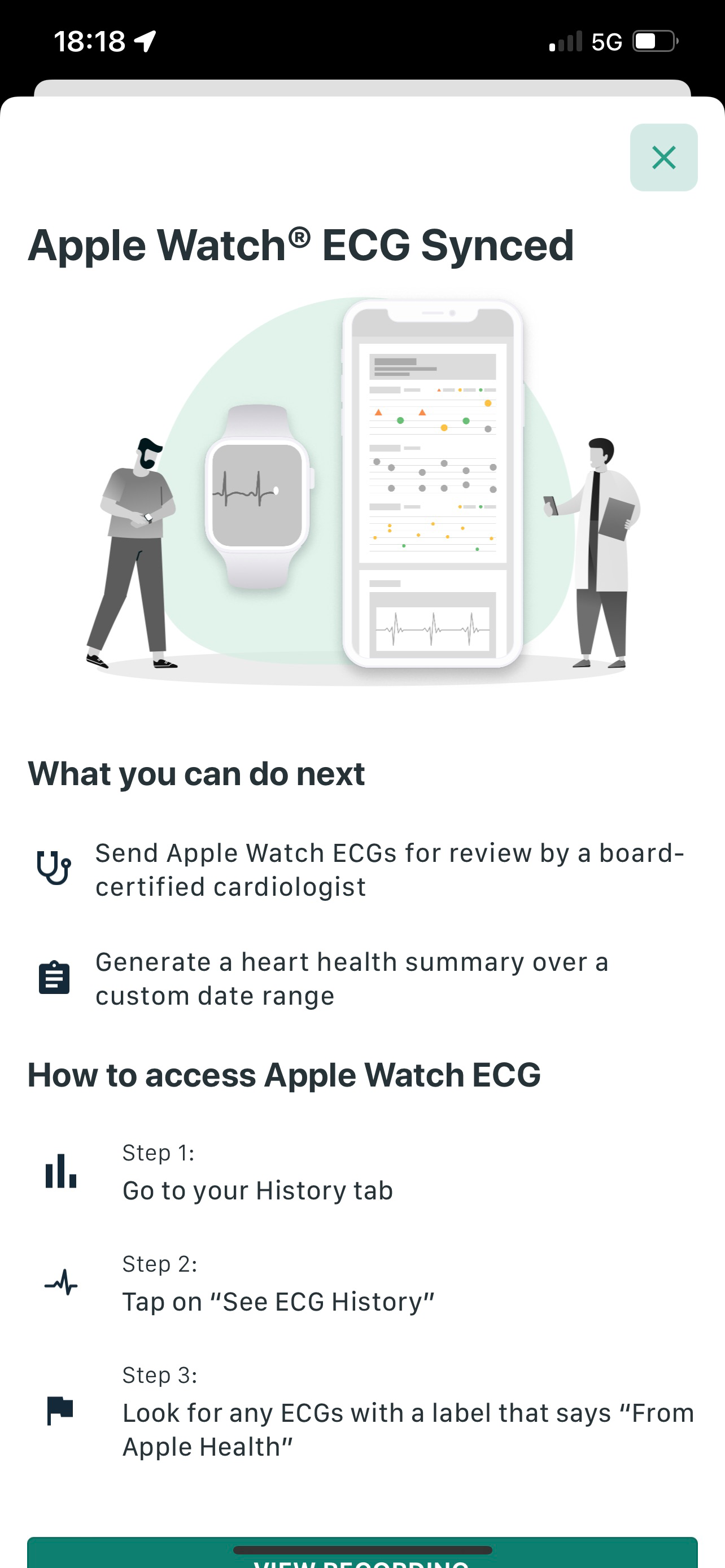
Once the readings have been taken you are notified that the ECG's have been saved to Apple Health (if sync'ed to Apple Health) and can be viewed on your Apple Watch (so it can be shown to a doctor or clinician).


You are also given a summary of the ECG


It's then possible to share the ECG as a PDF and it takes the whole chart like you'd get from a ECG machine in a hospital (but split into pages).

Note the first page often has weirdness at the beginning as you settle down and stabilise the readings.


The next pages tend to be cleaner with just the normal ECG displayed


 The final page is an averaged heart rate


As stated previously it really is imperative to keep as still as possible to get a clean reading. The app will diagnose simple abnormalities such as Atrial Fibrillation, Bradycardia, Tachycardia and a normal heart rhythm. Giving the ECGs to a doctor may help them diagnose arrhythmias and cardiovascular diseases.

The unit is FDA approved as a medical device (which is very different to other wearables that a fitness devices) and acts as though it uses ECG leads I, II, III, aVL, aVR, aVF.

If you're worried at all about heart conditions, this could be for you, it's easy to use and gives good results.

The basic Kardia 6L costs £149 in the UK (direct from the site) and £228 with the addition of a year of KardiaCare which allows advanced determinations (analysis), the results are shared with clinicians and stored in the cloud and you get a heart health summary report. Purchasing separately a plan costs £99 or £179 for 2 years.


2022/01/19

ConceptDraw Office gets an upgrade

 ConceptDraw Office has now been upgraded to version 8 and it contains 3 (well really 4) main packages: -

  • ConceptDraw DIAGRAM v15
  • ConceptDraw MINDMAP v13
  • ConceptDraw PROJECT v12

There is also ConceptDraw STORE which offers access to various ConceptDraw solutions and upgrades to the main packages too.


Diagram offers professional-quality graphic solutions of all sorts for all businesses, Mindmaop is essential to strategic planning, knowledge and team management and Project provides a professional approach to portfolio and project management.

ConceptDraw Office is available both on Microsoft Windows and Apple macOS and are alternative offerings to Microsoft Visio and Project.

Though the applications can run standalone for basic primitives, the flexibility comes when the Solutions are added, all 215 of them. Many are free and can be downloaded via the Store, while some are paid for and new Solutions are being added all the time.

The categories of Solutions are: -

  • Building Plans
  • Business Infographics
  • Business Processes
  • Business Productivity
  • Collaboration
  • Computers and Networks
  • Dashboards
  • Diagrams
  • Finance and Accounting
  • Food and Beverage
  • Graphs and Charts
  • Health
  • Illustrations
  • Industrial Engineering
  • Infographics
  • Management
  • Maps
  • Marketing
  • Project Management
  • Quality Management
  • Science and Education
  • Software Development
  • Sport
  • Statistical Charts

Some of these are just building blocks, while others can be connected to data to produce charts/infographics based on the data.

Examples of some of the actual building blocks

Divided Bar Chart

Financial Infographics


Sport - Baseball Field


Above infographics may be static or utilise data (such as the divided bar chart) or just a picture like the baseball field.

The applications can import Word, Excel, Powerpoint, Project, Visio, Mindmanager, Xmind and Freemind documents and export pdf, images, Outline, Word, Excel, Powerpoint, Project and Visio.

There still are differences between the Windows and macOS versions such as it's only possible to explore pdf layers on the Windows version of the software.

The STORE also allows upgrading the applications and solutions


It's also possible to purchase new solutions (when a new solution is published it will have a green flag on it)


The applications can be purchased individually or as ConceptDraw Office which contains all of them.

Single user pricing is as follows: -

  • ConceptDraw OFFICE 8 £399 (but seems to be £239 now)
  • ConceptDraw DIAGRAM 15 £159
  • ConceptDraw PROJECT 12 £239
  • ConceptDraw MINDMAP 13 £159
  • ConceptDraw MINDMAP 13 & PROJECT 12 £319

So Office seems a bargain at the moment.

The solutions vary in price.

If you need a suite of applications that can do mind mapping and project planning and you don't want to go the Microsoft route, this could be for you.


2021/12/01

Can a cloth be this clever?

Apple came out with new thing called a "Polishing Cloth" which is a microfibre cloth for cleaning screen, being fruity it comes with a fruity price tag.

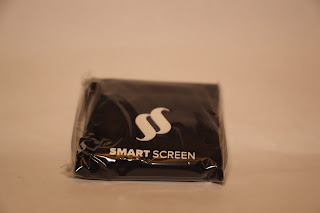
So now there's Smart Screen an antibacterial, microfibre smartphone cloth.

Smart Screen box

The cloth comes in a box that is obviously designed for retail as there's a plastic tab at the top with a hole in it suited for hanging on something.

Opening the box was a struggle as the internals are behind a tab that looks like it should be pulled to, but only needs to be slightly moved.

Pouch (wrapped in plastic)


The cloth comes out, but it's encased in a hermitically sealed plastic wrap. Which seems unnecessary since it's sealed in the box in the first place. Ripping that open exposes the pouch holding the cloth.

Smart Screen pouch


The pouch is about 2 inches square and holds the folded cloth which is attached by a piece of material and held by a popper.

Pouch with attached cloth

Then the cloth unfolds

Cloth folded in half

The cloth is impregnated with Blue Shield nano silver particles which (according to the manufacturer) will kill 99% of all bacteria and it will survive 15 washes at 30 degrees.

As a cloth it does clean screens (though it wasn't possible to test the accuracy of the bacterial killing properties).

It only costs £9.95 directly from Smart Screen, though an up market "gold" version is available for £11.50 (or a replacement gold cloth for £4.40). 

Standard colours are Navy Blue, Slate Grey, Powder Blue, Saffron Yellow, Polar White and Camel Brown.

I would guess it's as functional as the fruity equivalent (though never tested that particular cloth).


2021/11/11

It's time to put Nothing in your ear (1)

Nothing is a London based consumer tech company who's mission is "to remove barriers between people and the technology we all use. By designing intuitive and smart technology that improves our lives without getting in the way Nothing wants to bring back artistry, passion, and trust. We want to help people unlock new and meaningful experiences not just in consumer electronics, but also in life." (from their website).

The first product is the ear (1) an in-ear earphone which features noise cancellation. They come with the usual 3 sized silicon tips (small, medium and large - though it's a shame there's no memory foam ones available). They come in a plastic case which holds the earphones magnetically so they align with the charging pins. The right earphone has a red dot on it (as does the magnet in the base) so it's easy to ensure the correct earphone goes into the right ear (sic). They are pretty light at 4.7 grams.

Nothing ear (1) case with earphones

They come in a black box with pictures of the earphones, but to open it there's a tear strip so it can be pulled apart. Inside there's a shiny metalised case that pulls open and contains the earphone base (the earphones are in it), a side part containing the ear tips and another containing the USB C charging cable. The outer box does seem a bit of a waste.

Nothing ear (1) outer box


Nothing ear(1) box showing earphones in case

Nothing ear(1) box with side boxes holding tips and USB cable


The case is 58.6 by 58.6 by 27.3 mm and has a USB C port and a button which is pressed to start the pairing process. It can also be charged wirelessly through any QI compatible charger. It weighs 57.4 grams without the earphones.

Nothing ear(1) case with USB and pair button

Nothing ear(1) earphones

There's an accompanying app (iOS and Android) that when connected shows the charge of the left and right earphones.

iOS app (charge)

It allows switching between Noise Cancelation, Transparency and off (and whether it light or maximum).

iOS app noise cancellation etc

Then the equalisation can be selected (Balanced, More Treble, More Base, Voice).

iOS app equaliser

Tap settings can also be selected for both earphones (Triple Tap -> Next Song, Previous Song, nothing and Tap & Hold -> Noise Cancellation, nothing).

The app also allows (per each ear pair incase you've paired multiple pairs) In-Ear detection, Latency Mode (Normal or Low - designed for playing games but more prone to interference from other devices) and Firmware Update (it shows the current version and will allow clicking if a new version is available, updates are via Bluetooth and it can be quite slow and it's easy to think nothing's happening before the upgrade starts).

iOS app settings


The instructions that come in box imply that the the earphones should be paired with the app (there's an option in the settings), however on iOS it did pair with the app, but music and other apps didn't seem to be able to output sounds through the earphones. When paired within the Bluetooth settings, the app recognised that the earphones were paired and all the functions worked and sounds and music could be heard though any app.

The batteries in the earphones should last around 5 hours and the case holds enough for 34 hours use (though you obviously need to put them into the case to charge them) - if active noise cancellation is on, then the total case time reduces to 24 hours.

The quality seems pretty good and they also work well for video conference calls (well some better than other, Google Meet decided to echo back your own voice).

The signal travels well and audio only started breaking up about 10 metres from the connected computer (and going through some internal walls).

With ear detection on, the music should pause, but when using with a device other than a phone it doesn't seem to work while triple tapping does move to the next track. This behaviour seems to have changed since the last firmware update as jiggling your head around (or dancing vigorously) would trigger something and the music would pause.

Overall the build and sound quality is very good and for only £99 pretty good value compared to fruity alternatives. They are available directly from Nothing's site and should arrive in a few days.


2021/09/15

Humax Aura a great Freeview PVR (but missing stuff)

Humax released the Aura a while back and it's a great little PVR (it comes in 1TB or 2TB versions which equates to 500/250 or 1000/500 hours of SD/HD recordings respectively) and supports displaying 4K HDR10 on a 4K TV for supported apps.


It runs genuine Android TV (v9 Pie) which is optimised for this kind of device and it has the Google Play store for downloading apps (not all apps will run on a PVR) and it can be paired with a Bluetooth keyboard and mouse. You do need to sign into your Google account in order to actually download anything and use the added functionality. It runs on a 4 core CPU with 16GB of Flash storage and 3GB of RAM.

It has Google Assistant built in, which allows controlling the system and well as normal assistant functionality. There's also built-in Chromecast, so content on an Android phone can be displayed through the PVR.

As a Freeview Play device, it's possible to record future programs (and series links) as well as catching-up on stuff that you may have missed (requires an Internet connection). The EPG is 7 days in future as well as 7 days past which directly accesses the Freeview Play catch-up service.

If you happen to have content on a USB drive, plug it in and play away (as long as it's FAT32 formatted) via the USB3.0 port, accessing NAS drives via the network also works and it's possible to install a Plex client (via Google Play) for added functionality.

There's an accompanying Aura app (Android/iOS) that allows live streaming, recording and reminders etc.

The remote is easy to use and allows access to the EPG and a big button with Prime Video to access Amazon Video. There are a lot of apps available, but there's a HUGE omission in that so far there's no direct access to Netflix (that may not matter if you have a relatively modern TV with it built in). There are 'hacks' around to side load Netfix, but no official version seems to be available and it looks unlikely it will ever appear.


The actual box is nicely sized (258 x 43 x 200 mm) and easily fits under or next to a TV, on the front there's a strip that glows red if in standby and blue if turned on, it will go purple if recording or orange if recording in standby and white for Google Assistant.

The Ethernet LAN port supports Gigabit Ethernet connectivity or there's 2.4/5GHz WiFi.

There's an co-ax input and output for the aerial connection (and to TV) and also a single HDMI port (supporting HDMI 2.1 with HDCP 2.3 and CEC) and a S/PDIF optical port for audio out (to say a sound bar). There's Dolby Audio (Dolby Digital, Dolby Digital Plus) Dolby Atmos (pass-through) DTS-X surround sound (pass-through) over HDMI as well as HD Audio at 24bit/192KHz.

Nicely Humax include an Ethernet, HDMI and co-ax cable and batteries for the remote.

When the system is initially powered it takes a while to set-up (needs to tune, upgrade Android TV and any apps) and it can be fiddly if you get the order wrong.

Settings are also accessed by pressing the Freeview button, which isn't necessarily obvious, but everything is really an app on Google TV.

Though the lack of Netflix may be a game changer for some, it does have access to a lot of video services such as BT Sport, Amazon Prime Video, Disney+ and My5, iPlayer etc. It's also possible to run some games, though those that require additional peripherals may not work as expected.

The RRP is £249 for the 1TB version and £279 for the 2TB though on-line prices may be cheaper.

2021/05/26

Need to grab something from you Mac, TextSnipe it

Mac's have come with a screenshot utility for quite a while (surprisingly called Screenshot), it's pretty useful and allows capturing the complete screen, a window or a (selectable) area. It can do this as an image or even a video.

While active it takes screen focus so you are unable to interact with the screen, so there's a nice feature allowing a grab in 5 or 10 seconds so setup the grab area, interact with whatever's needed and then screenshot will grab an image (this works well for grabbing drop down menus and other such things).


 The above image is a screen grab of the dropdown menu of TextSniper.app, While Screenshot grabs an image or video, TextSniper grabs the content of the highlighted area and saves it to the clipboard.

Grab the screen around some text (that text can be on an image, PDF document or anything) and whatever is there will be text in the clipboard. Just open your favourite editor and paste and it's all there. It will also do the same for a QRcode, again just bound the QRcode on screen and the contents are saved in the clipboard (useful for reading things like the UK NHS Covid QRcode - your phone will just say it's unidentified content), this will also decode barcodes as well as QRcodes.

TextSniper will also grab stuff from a connected iPhone or iPad (needs to be connected by USB or WiFi) and then you can take a photo, scan documents or add a sketch.

If Text to Speech is clicked, then when text is captured as well as being copied to the clipboard it will be read (playback speed is selected in Preferences).

This may be one of the most useful utilities out there, it can be purchased directly from the TextSniper.app for $6.99 or from the Apple Mac Store though the price goes up to $9.99 (and may vary with local pricing). Highly recommended.

2021/04/28

Want the perfect microphone, then be sure with Shure

Shure has been in the commercial microphone and in-ear phone space for many years (almost 100 as it was founded in 1925) starting in AM radio, then in the 30's developing microphones, then in the 40's developing headphones for the allies. The 50's produced the first stereo phono cartridge in conjunction with Columbia records. The 60's went swingingly with a dynamic microphone used by the White House ever since and the SM58 (studio microphone) favoured by rockers the world over. The 80's moved into teleconferencing products and cardiod microphones suitable for high gain while being resistant to feedback. The naughties (90's) went wireless and in ear personal monitoring system (earphones).

Moving into the millennium Shure acquires Tripp Ribbons Microphones and launches their SRH range, then in 2010's it's all about 24bit wireless, pro in-ear and the MOTIV digital line and now in the 20's it's working from home and partnerships with Logitech, prosumer home microphones and Ionic wireless in-ear.

That's a lot of products, so what's suitable for you?

There's a plethora of microphones, though all could be used, some are better suited to particular uses vocal, loud etc. and Shure have designed a simple quiz to help people select the best microphone for it's intended use and budget.

It's really designed for musicians and singers and it would have been nice to add sections for bloggers/vloggers, Zoom and other non-music activities, but it's quite useful as is.

Shure do make some very nice audio products and now with Home/Prosumer do have a look.

Go back in time with a Divergence Meter Nixie clock

Clocks are useful things, mostly they tell the time and this is generally a good thing.

Though we live in a digital age, people do have a thing for clocks, especially those that are worn on the wrist and these come in a multitude of varieties. These were analogue, then came the invention of the digital watch and then people spent a lot of money on analogue versions again.

Clocks (as in actual clocks) have tended to remain analogue, circular discs with hands that move around pointing to digits painted (or embossed) around the edge. Clocks can be powered with some clever electronics so they keep time accurately such as using a radio time signal.

Digital clocks to exist and they use flat displays such as e-ink, OLED or LCD. They tend not to be very pretty.

In the past, lots of devices used something called a Nixie display, they look like vacuum tubes, except rather than warming up they have a variety of cold cathodes inside, shaped to look like numbers or digits. They were popular in the 1960's but there has been a recent resurgence and a numeric variety the IN-14 is still available.

Nixie tubes are filled with low pressure neon (and sometimes some other gasses or mercury to change the colour) and when a voltage (around 200V) is applied, the cathode will glow. If the gas is neon based, it's usualy a nice orange glow.

Some enterprising Ukrainians have decided to design and build pretty clocks based on Nixie tubes. These come in several varieties and can be Arduino or Raspberry Pi based using IN-14 or IN-18 Nixie tubes and in kit form or preassembled. This review is on the Arduino Shield NCS314 IN-14 variety and has an external DS18B20 temperature sensor. It's also possible to connect an external GPS that uses NMEA protocol and the clock will maintain time, however the GPS unit does need to maintain visibility of the sky so may not be suitable for indoor use.

There are also RGB LEDs that illuminate the base of the Nixie tubes, but these can be distracting rather than adding aesthetics. This also uses the Arduino MEGA board which runs the software (all available on Github).

There is a mode button which switches between time, date and alarm mode (and up and down buttons to change settings). The LEDs are turned on and off by long pressing the down button and then using the up and down buttons to change the colour.

If you're into pretty old fashioned "digital" clocks, you cant go wrong with a Nixie clock (it is beautiful). The costs vary depending on what options are selected (with/without tubes, sockets, temp sensor, GPS, Arduino Uno/MEGA), but the version shown is about $170.00

2021/04/14

It's a bendy electronic thermometer

 It's always useful to be able to measure your temperature, especially when the world is in the throws of a pandemic where early signs of a fever could be mean getting help or not.

Kinsa is a US company that make thermometers with an app, they state their mission is "to stop the spread of infectious disease by knowing where and when it starts" and they have a HeathWeather map (currently seems to be US only).

There are two thermometers, one is an in ear device and the one reviewed here is inserted orally, under the arm or rectally (not tested). It has a flexible stem with a metal tip, which connects to a round top which contains the electronics, battery (CR2032) and a display which has a backlight.


The companion app is available on iOS and Android and allows multiple profiles for different users. The device must be paired with the app before use.

The backlight is quite bright which makes it quite difficult to show the display, but it can display in Centigrade or Fahrenheit which is set through the app.


It's really easy to use, just push the button and 3 dashes will appear on the display and then insert in to the relevant orifice. Within a short time the temperature will be read and appear on the display and in the app where it can be assigned to a user and the temperatures displayed as a timeline that can be shared with health professionals.

The thermometer is fully FDA approved.

It's available online directly through the Kinsa Health store for a very reasonable $24.99 (though can be cheaper on big shopping sites that will ship to the UK).

2021/04/04

It's time to move those bits at 2,500 Mb/s

 No idea why people like quoting figures like 2,500 mA (2.5A) for chargers and other devices, well thankfully D-Link have announced the DUB-E250 a USB-C to 2.5G Ethernet adapter.

D-Link DUB-E250 box


Opening the box reveals a large plastic holder into which the adapter is firmly held in place (though a complete was of plastic packing) and a paper limited warranty in many languages (that no-one is likely to read).


The adapter has a plastic rectangle with Ethernet socket at the end and a standard USB-C connector at the other.

It just works, plug it in to the USB C ports of a PC, Mac or Linux box and a Ethernet device appears supporting up to 2.5Gb/s networking. No drivers, no installs.

Unfortunately there was no 2.5G infrastructure to plug it into at the time, but it also works perfectly happily with 1G network switches just operating at 1Gb/s speeds. Will probably try in on a iPadPro with USB-C port to see if anything is detected and upgrade the blog if it does.

It costs around £30 on-line and if you have a lot of data to get on or off a PC device and a network to support it, then it's a good option, though most consumer hardware is still only 1Gb/s and there won't be any gain to upgrading.

In future as consumer does move to 2.5G or even 10G then this could be for you (probably more realistically a good device for 'techies' who need to plug into Dada Centre networks and monitor and access services or as companies go back to work and update their networks.